
openQCM Wi2Measure, log, repeat.
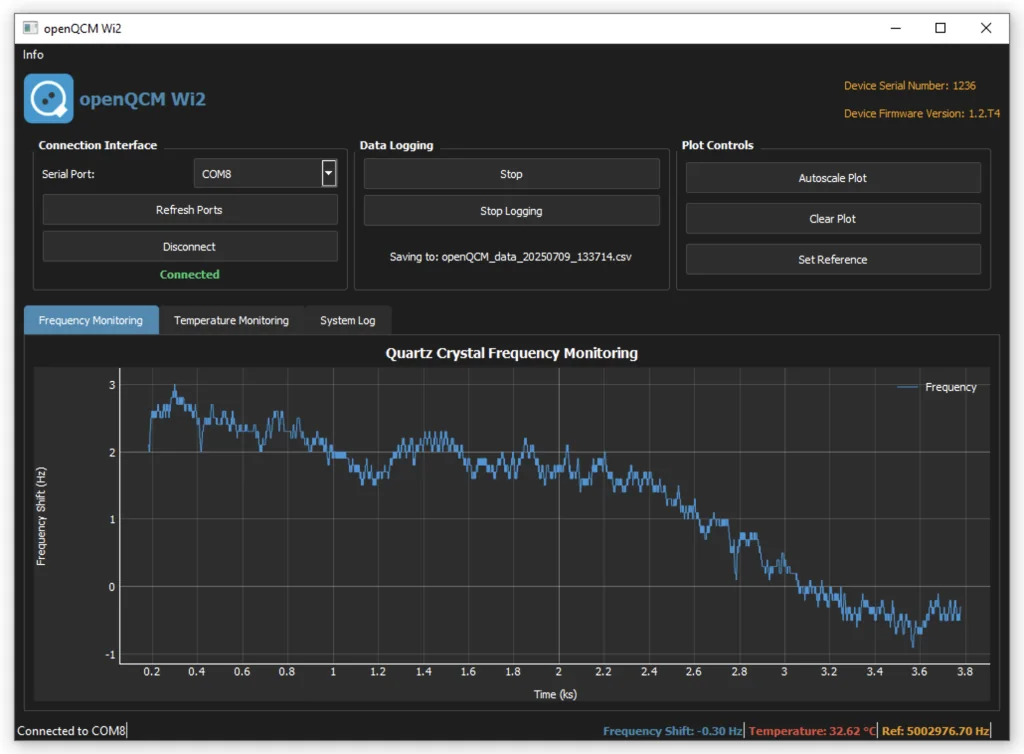
The software displays real-time QCM frequency changes automatically, with integrated temperature monitoring — developed in Python and available as a standalone Windows application for improved stability and performance.
- Instrument
- openQCM Wi2
- Sheet
- 05 / 06
- Title
- Software
- Drawn
- openQCM · Pompeii
Several instruments, one computer.
Experimental data can be saved to a file for later post-processing and customized analysis. The software uniquely identifies devices connected to COM ports, allowing the simultaneous connection of multiple devices to your PC.
The firmware is fully compatible with the Arduino programming language and environment. openQCM Wi2 Python Software v2.1 requires firmware version 1.2.T4 — see the firmware programming guide for complete installation and troubleshooting instructions.
How to install the software
# Download and unzip openQCM Wi2 v2.1 for Windows# Open the folder and launch the application: no installation# Windows 10 or later · 4 GB RAM (8 GB recommended) · 300 MB · USB port
# Install Anaconda Distribution 2022.05 for your systemconda install pyserial pyqt5 pyqtgraph numpy# Linux only: serial permissions, then log in againsudo usermod -a -G uucp,dialout $USER# From the Wi2 folderpython main.py
Software, firmware, documentation
Files served from openqcm.com and the vendors' sites. Open source: see the licence inside each package.