
Benchtop instrumentsopenQCM NEXTQCM-D on every overtone, chamber held at ±0.01 °CopenQCM Q-1QCM-D on one selected overtone at a timeopenQCM Wi2Frequency QCM, USB-powered and wireless-ready
Sheet 04 · Software
openQCM (2014) · Open-source QCM softwareopenQCM software, for every platform.
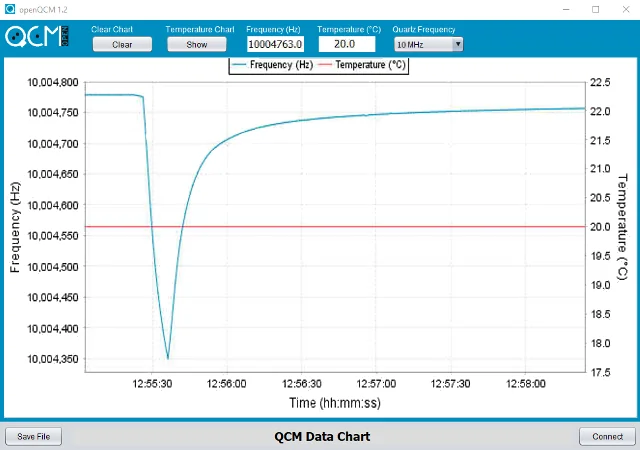
openQCM version 1.2 is the application software for the open-source quartz crystal microbalance. It runs on Windows, macOS and Linux — download and install the build for your platform.
- Instrument
- openQCM (2014)
- Sheet
- 04 / 05
- Title
- Software
- Drawn
- openQCM · Pompeii
User interface
Connect, read, plot, save.
- 01Connect Arduino — find the COM port and set the serial connection between the Arduino board and your PC.
- 02Read data — read the QCM frequency and temperature data on the COM port.
- 03Plot data — plot frequency and temperature on a real-time chart.
- 04Save data — save frequency and temperature to a text file.
Open project
Written in Java, open on GitHub.
openQCM is a fully open-source project, written in Java with the NetBeans environment. Join the community and contribute — the entire project is on GitHub, with a Wiki for system configuration.
Install
Install on your platform
# Unzip openQCM-1.2-win.zip and launch openQCM-1.2.exe# Install the Arduino (FTDI VCP) driver if needed
# Install Java Runtime 8, unzip openQCM-1.2-mac.zip# Put the RXTX natives in /Library/Java/Extensions, thenjava -jar openQCM.jar
sudo usermod -a -G uucp,dialout $USER# Log out and in again, unzip openQCM-1.2-linux.zip, run the application
Downloads
Software and firmware
Files served from openqcm.com and the vendors' sites. Open source: see the licence inside each package.